



Stay Updated with the Latest AI Agent Insights

Join 24,000+ AI enthusiasts and professionals

Discover the newest AI agents, tools, and automation trends shaping the future of work. From powerful agent builders to cutting-edge workflow automation, we break down what matters so you can stay ahead.

Get expert insights, tool comparisons, and curated recommendations—all in one place.

ClipBuddy Review

ClipBuddy Review

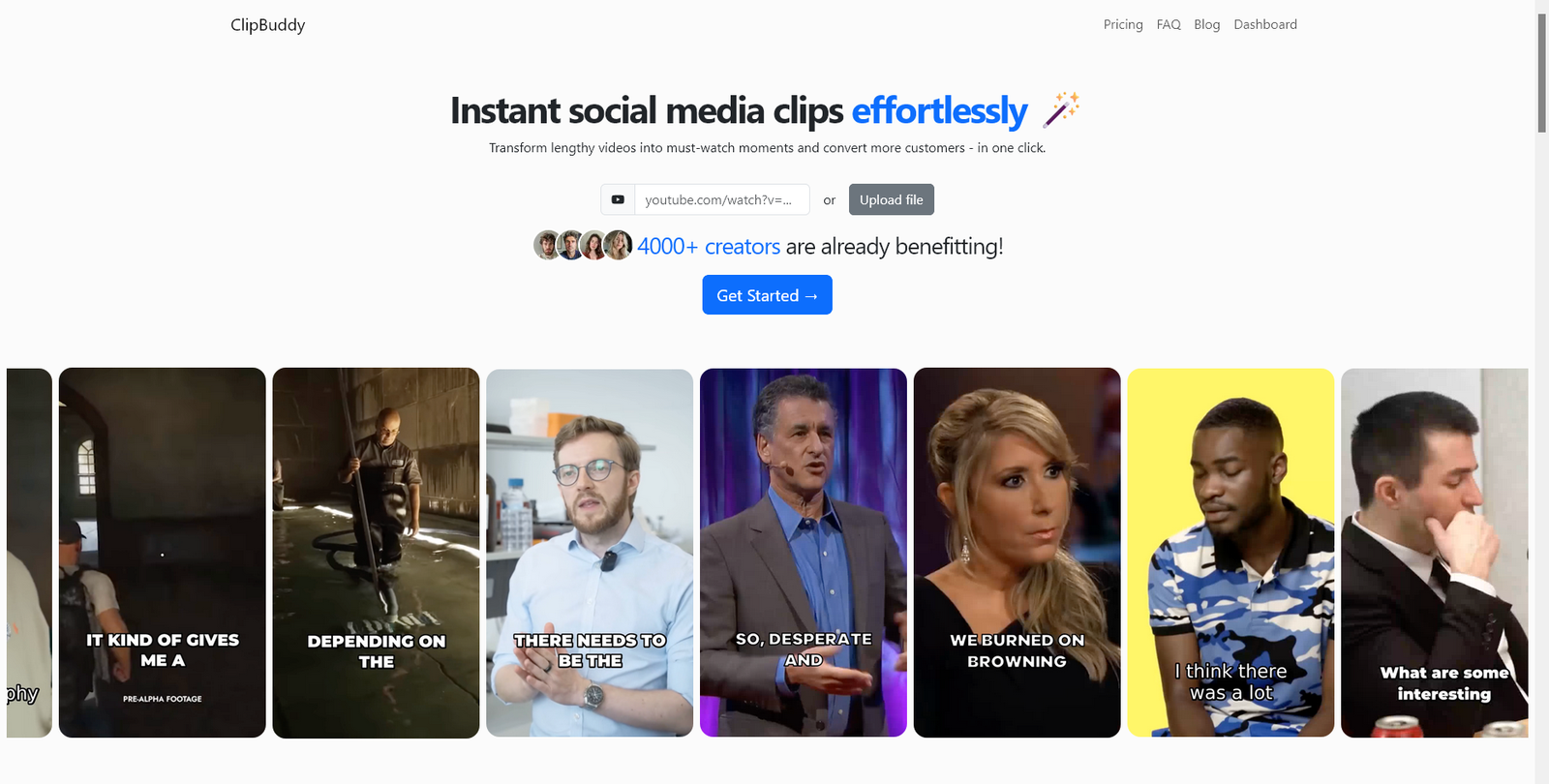
ClipBuddy is an AI video editing tool that automates trimming, captions, and clip creation, making it easy to produce short-form content quickly for social media platforms.

  • Overall
4.2/5Overall Score

ClipBuddy is an AI-powered video editing platform that simplifies content creation through automation and ease of use. It is best suited for users who want to create and publish videos quickly, especially for social media, while sacrificing some advanced editing control.

ClipBuddy Review (2026): AI Video Editing Tool for Fast, Automated Content Creation

Category: AI Video Editing / Content Creation


Pricing Snapshot

PlanPriceNotes
Free TierLikely availableLimited exports or features
Paid PlansNot publicly disclosedExpected subscription-based
Pro / CreatorCustomHigher usage limits and advanced tools

Pricing Transparency: Low — limited public pricing details


Source Type

  • Product positioning and AI video editing analysis
  • Trends in automated video creation tools
  • Comparison with AI-powered editing platforms

Overview

ClipBuddy is an AI-powered video editing tool designed to automate content creation, editing, and optimization for modern digital platforms. It focuses on simplifying video production by enabling users to quickly edit, refine, and publish videos without advanced technical skills.

The platform is built for:

  • Fast video editing workflows
  • Automated trimming and formatting
  • Social media content creation
  • Scalable video production

ClipBuddy positions itself as a lightweight AI editor, ideal for users who want speed and simplicity over complex editing controls.


Key Features

1. AI Video Editing Automation

  • Automatically trims and edits video clips
  • Detects key moments and highlights
  • Reduces manual editing effort

2. Smart Clip Generation

  • Breaks long videos into shorter segments
  • Optimizes clips for engagement
  • Ideal for social media content

3. Auto Captions & Subtitles

  • Generates captions automatically
  • Enhances accessibility and viewer retention
  • Supports social-first content formats

4. Social Media Optimization

  • Formats videos for platforms like TikTok, YouTube Shorts, and Instagram
  • Adjusts aspect ratios and layouts
  • Improves content performance

5. Simple Editing Interface

  • Easy-to-use interface for beginners
  • Minimal learning curve
  • Quick editing and publishing

Use Cases

Social Media Content Creation

  • Create short-form videos quickly
  • Maintain consistent posting schedules
  • Increase engagement

Content Repurposing

  • Turn long videos into multiple clips
  • Maximize content output
  • Save time on editing

Marketing & Promotion

  • Create promotional videos
  • Generate campaign content
  • Improve brand visibility

Beginner Video Editing

  • Edit videos without technical expertise
  • Produce content quickly
  • Reduce reliance on professional editors

Pros and Cons

Pros

  • Fast and simple AI-powered video editing
  • Ideal for short-form content creation
  • Saves time on manual editing
  • Beginner-friendly interface
  • Supports scalable content production

Cons

  • Pricing not transparent
  • Limited advanced editing features
  • Less control compared to professional tools
  • Output may require manual adjustments
  • Not suitable for complex video projects

Feature Comparison

FeatureClipBuddyCapCut AIDescript
AI Editing AutomationYesYesYes
Clip GenerationYesYesLimited
Auto CaptionsYesYesYes
Editing DepthMediumMediumHigh
Ease of UseHighHighMedium

Alternatives

ToolBest ForKey Difference
CapCut AISocial video editingMore features and mobile focus
DescriptAdvanced editingFull editing suite
Opus ClipClip generationStronger AI clipping
PictoryVideo summarizationBroader content transformation

Verdict

ClipBuddy is a practical AI video editing tool that focuses on speed, automation, and simplicity, making it ideal for users who need to produce content quickly.

Its strengths include:

  • Automated editing and clipping
  • Ease of use for beginners
  • Strong fit for social media workflows

However, limitations include:

  • Limited customization and advanced editing
  • Pricing transparency issues
  • Not suited for professional-grade production

Best suited for:

  • Content creators and influencers
  • Social media marketers
  • Beginners in video editing

Not ideal for:

  • Professional video editors
  • Complex video production projects
  • Users requiring full creative control

Rating

CategoryScore
Features4.2 / 5
Ease of Use4.6 / 5
Automation4.4 / 5
Pricing Transparency2.9 / 5
Overall4.2 / 5

FAQ

What is ClipBuddy used for?

ClipBuddy is used to automate video editing and create short-form content quickly.

Does ClipBuddy add captions?

Yes, it automatically generates captions and subtitles.

Is ClipBuddy beginner-friendly?

Yes, it is designed for users with little to no editing experience.

Can ClipBuddy replace video editors?

It helps with basic editing but does not replace professional tools.

Who should use ClipBuddy?

Content creators, marketers, and users producing social media videos.


Share your love
AI AGENT
AI AGENT
Articles: 131

Leave a Reply

Your email address will not be published. Required fields are marked *