



Stay Updated with the Latest AI Agent Insights

Join 24,000+ AI enthusiasts and professionals

Discover the newest AI agents, tools, and automation trends shaping the future of work. From powerful agent builders to cutting-edge workflow automation, we break down what matters so you can stay ahead.

Get expert insights, tool comparisons, and curated recommendations—all in one place.

Phoenix Review
Phoenix Review
  1. Phoenix Review
  2. Phoenix Review

Phoenix Review

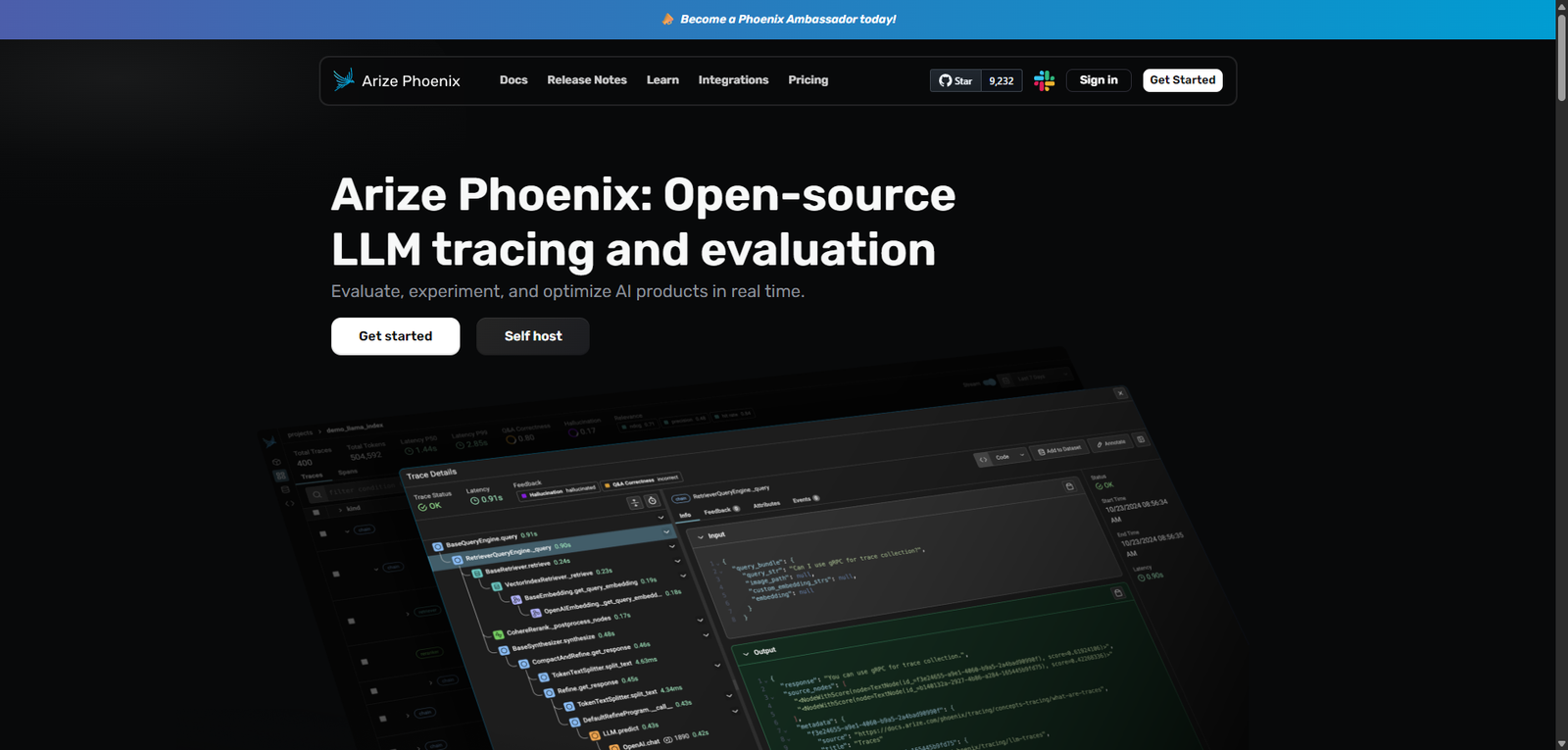
Phoenix is an open-source LLM tracing and evaluation platform that enables developers to monitor, debug, and optimize AI applications in real time. It provides deep observability into model behavior, helping teams improve reliability, performance, and decision-making in production AI systems.

  • Overall
4.2/5Overall Score

Phoenix is a developer-first, open-source observability platform for LLM applications, offering deep insights into AI behavior through tracing and evaluation. It is a strong choice for teams that need control, transparency, and advanced debugging capabilities, though it requires technical expertise to unlock its full potential.

Category: AI Agent Builder / LLM Observability / Evaluation Tools


Pricing Snapshot

PlanPriceNotes
Open SourceFreeSelf-hosted and fully customizable
Hosted OptionNot specifiedসম্ভাব্য managed deployments
EnterpriseCustomاحتمالي support and scaling features

Pricing Transparency: High (for core product) — open-source availability


Source Type

  • Open-source project positioning
  • Developer-focused documentation and feature descriptions
  • Observability and LLM tooling ecosystem comparison

Overview

Phoenix is an open-source LLM tracing and evaluation platform designed to help developers monitor, debug, and optimize AI applications in real time. It provides deep visibility into how large language models behave across workflows, making it particularly valuable for teams building production-grade AI systems.

Unlike general AI agent builders, Phoenix focuses on observability and evaluation, offering tools to:

  • Trace LLM calls and workflows
  • Analyze model outputs and decision paths
  • Identify performance issues and anomalies
  • Improve reliability through structured evaluation

It functions as a diagnostic layer for AI systems, enabling developers to understand not just what an AI outputs—but why.


Key Features

1. LLM Tracing & Observability

  • Track every LLM interaction across applications
  • Visualize execution paths and dependencies
  • Debug multi-step AI workflows

2. Automated Instrumentation

  • Capture data from LLM applications without heavy manual setup
  • Integrates into existing pipelines
  • Reduces overhead for monitoring

3. Real-Time Evaluation

  • Analyze outputs as they are generated
  • Detect anomalies, inconsistencies, or failures
  • Optimize model performance continuously

4. Custom Evaluation Frameworks

  • Define evaluation metrics tailored to your use case
  • Compare outputs across models or prompts
  • Support structured testing and benchmarking

5. Human Feedback Integration

  • Incorporate human-in-the-loop evaluation
  • Improve model quality with feedback loops
  • Useful for alignment and fine-tuning workflows

Use Cases

LLM Application Debugging

  • Identify why outputs are incorrect or inconsistent
  • Trace prompt chains and tool usage
  • Diagnose latency or failure points

AI Model Evaluation

  • Benchmark different models or prompts
  • Measure accuracy, relevance, and consistency
  • Track improvements over time

Production Monitoring

  • Monitor live AI systems
  • Detect regressions or unexpected behavior
  • Maintain reliability at scale

AI Development Lifecycle Management

  • Support experimentation and iteration
  • Improve collaboration across teams
  • Standardize evaluation processes

Pros and Cons

Pros

  • Fully open-source and transparent
  • Strong focus on LLM observability and debugging
  • Supports real-time evaluation workflows
  • Flexible and customizable for advanced use cases
  • Enables deeper understanding of AI behavior

Cons

  • Requires technical expertise to deploy and use
  • Not a plug-and-play solution for beginners
  • Limited UI polish compared to commercial tools
  • Documentation depth may vary depending on version
  • Lacks built-in business workflow automation features

Feature Comparison

FeaturePhoenixLangSmithWeights & Biases
Open SourceYesNoPartial
LLM TracingYesYesLimited
Real-Time EvaluationYesYesYes
Custom MetricsYesYesYes
Ease of UseMediumHighMedium

Alternatives

ToolBest ForKey Difference
LangSmithLLM debuggingProprietary and tightly integrated with LangChain
Weights & BiasesML monitoringBroader ML focus, less LLM-specific
HeliconeAPI observabilitySimpler but less comprehensive
PromptLayerPrompt trackingMore lightweight tracking solution

Verdict

Phoenix stands out as a powerful open-source solution for LLM tracing and evaluation, offering developers full control over how they monitor and improve AI systems.

Its strengths lie in:

  • Transparency and flexibility
  • Deep observability capabilities
  • Real-time evaluation and debugging tools

However, it is best suited for:

  • Developers and ML engineers
  • Teams building production AI systems
  • Organizations prioritizing control and customization

Less suitable for:

  • Non-technical users
  • Teams needing plug-and-play SaaS solutions
  • Simple automation use cases

Rating

CategoryScore
Features4.6 / 5
Ease of Use3.5 / 5
Flexibility4.8 / 5
Documentation4.0 / 5
Overall4.2 / 5

FAQ

What is Phoenix used for?

Phoenix is used for tracing, evaluating, and debugging LLM-based applications in real time.

Is Phoenix free?

Yes, Phoenix is open-source and free to use, with optional hosted or enterprise setups.

Who should use Phoenix?

Developers, ML engineers, and teams building AI-powered applications.

Does Phoenix support production environments?

Yes, it is designed for both experimentation and production monitoring.

Is Phoenix an AI agent builder?

Not directly—it supports AI systems by providing observability and evaluation rather than building agents.



Share your love
AI AGENT
AI AGENT
Articles: 131

Leave a Reply

Your email address will not be published. Required fields are marked *