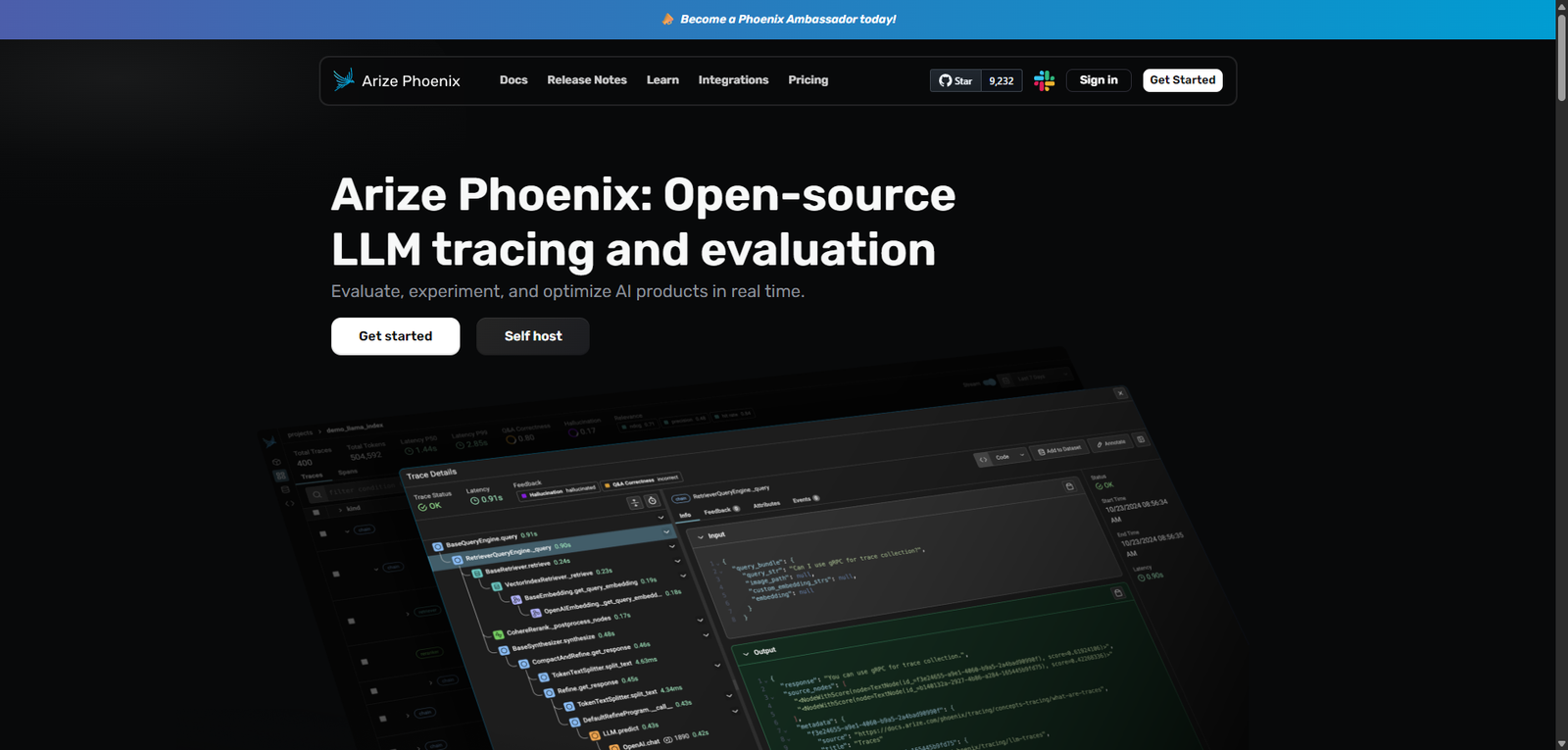



Phoenix is a developer-first, open-source observability platform for LLM applications, offering deep insights into AI behavior through tracing and evaluation. It is a strong choice for teams that need control, transparency, and advanced debugging capabilities, though it requires technical expertise to unlock its full potential.
Category: AI Agent Builder / LLM Observability / Evaluation Tools
Pricing Snapshot
| Plan | Price | Notes |
|---|---|---|
| Open Source | Free | Self-hosted and fully customizable |
| Hosted Option | Not specified | সম্ভাব্য managed deployments |
| Enterprise | Custom | احتمالي support and scaling features |
Pricing Transparency: High (for core product) — open-source availability
Source Type
- Open-source project positioning
- Developer-focused documentation and feature descriptions
- Observability and LLM tooling ecosystem comparison
Overview
Phoenix is an open-source LLM tracing and evaluation platform designed to help developers monitor, debug, and optimize AI applications in real time. It provides deep visibility into how large language models behave across workflows, making it particularly valuable for teams building production-grade AI systems.
Unlike general AI agent builders, Phoenix focuses on observability and evaluation, offering tools to:
- Trace LLM calls and workflows
- Analyze model outputs and decision paths
- Identify performance issues and anomalies
- Improve reliability through structured evaluation
It functions as a diagnostic layer for AI systems, enabling developers to understand not just what an AI outputs—but why.
Key Features
1. LLM Tracing & Observability
- Track every LLM interaction across applications
- Visualize execution paths and dependencies
- Debug multi-step AI workflows
2. Automated Instrumentation
- Capture data from LLM applications without heavy manual setup
- Integrates into existing pipelines
- Reduces overhead for monitoring
3. Real-Time Evaluation
- Analyze outputs as they are generated
- Detect anomalies, inconsistencies, or failures
- Optimize model performance continuously
4. Custom Evaluation Frameworks
- Define evaluation metrics tailored to your use case
- Compare outputs across models or prompts
- Support structured testing and benchmarking
5. Human Feedback Integration
- Incorporate human-in-the-loop evaluation
- Improve model quality with feedback loops
- Useful for alignment and fine-tuning workflows
Use Cases
LLM Application Debugging
- Identify why outputs are incorrect or inconsistent
- Trace prompt chains and tool usage
- Diagnose latency or failure points
AI Model Evaluation
- Benchmark different models or prompts
- Measure accuracy, relevance, and consistency
- Track improvements over time
Production Monitoring
- Monitor live AI systems
- Detect regressions or unexpected behavior
- Maintain reliability at scale
AI Development Lifecycle Management
- Support experimentation and iteration
- Improve collaboration across teams
- Standardize evaluation processes
Pros and Cons
Pros
- Fully open-source and transparent
- Strong focus on LLM observability and debugging
- Supports real-time evaluation workflows
- Flexible and customizable for advanced use cases
- Enables deeper understanding of AI behavior
Cons
- Requires technical expertise to deploy and use
- Not a plug-and-play solution for beginners
- Limited UI polish compared to commercial tools
- Documentation depth may vary depending on version
- Lacks built-in business workflow automation features
Feature Comparison
| Feature | Phoenix | LangSmith | Weights & Biases |
|---|---|---|---|
| Open Source | Yes | No | Partial |
| LLM Tracing | Yes | Yes | Limited |
| Real-Time Evaluation | Yes | Yes | Yes |
| Custom Metrics | Yes | Yes | Yes |
| Ease of Use | Medium | High | Medium |
Alternatives
| Tool | Best For | Key Difference |
|---|---|---|
| LangSmith | LLM debugging | Proprietary and tightly integrated with LangChain |
| Weights & Biases | ML monitoring | Broader ML focus, less LLM-specific |
| Helicone | API observability | Simpler but less comprehensive |
| PromptLayer | Prompt tracking | More lightweight tracking solution |
Verdict
Phoenix stands out as a powerful open-source solution for LLM tracing and evaluation, offering developers full control over how they monitor and improve AI systems.
Its strengths lie in:
- Transparency and flexibility
- Deep observability capabilities
- Real-time evaluation and debugging tools
However, it is best suited for:
- Developers and ML engineers
- Teams building production AI systems
- Organizations prioritizing control and customization
Less suitable for:
- Non-technical users
- Teams needing plug-and-play SaaS solutions
- Simple automation use cases
Rating
| Category | Score |
|---|---|
| Features | 4.6 / 5 |
| Ease of Use | 3.5 / 5 |
| Flexibility | 4.8 / 5 |
| Documentation | 4.0 / 5 |
| Overall | 4.2 / 5 |
FAQ
What is Phoenix used for?
Phoenix is used for tracing, evaluating, and debugging LLM-based applications in real time.
Is Phoenix free?
Yes, Phoenix is open-source and free to use, with optional hosted or enterprise setups.
Who should use Phoenix?
Developers, ML engineers, and teams building AI-powered applications.
Does Phoenix support production environments?
Yes, it is designed for both experimentation and production monitoring.
Is Phoenix an AI agent builder?
Not directly—it supports AI systems by providing observability and evaluation rather than building agents.